![SMART ENERGY WEEK [March]](/content/dam/sitebuilder/rxjp/wsew/images/en/spring/2026/register/smart-energy-week-register-image01.png/_jcr_content/renditions/original.image_file.375.165.file/685382196/smart-energy-week-register-image01.png)
![Sustainability Management Week [March]](/content/dam/sitebuilder/rxjp/wsew/images/en/spring/2026/register/smart-energy-week-register-image02.png/_jcr_content/renditions/original.image_file.375.104.file/664528672/smart-energy-week-register-image02.png)

Trouble Shooting
Example of Error
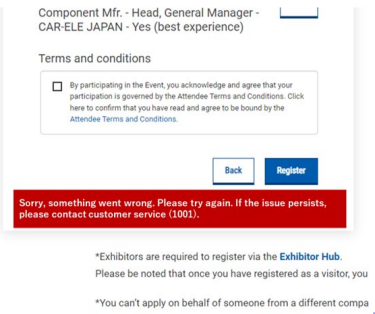
If you encounter an error on the 'Review' page, please attempt to switch your internet connection.
If the error persists, Show Management can complete the registration on your behalf. Please contact Show Management and provide a screenshot of the error.
Contact:
Email: [email protected]
Attn.: Itsuki Imamura, Hitomi Imamura
How to Fill Out the Entry Badge Registration Form
1. Choose the number and click "Next"

2. Choose who you are registering for

3. Fill in your information
This number will be used in case of an emergency and for marketing purposes. You can update your marketing preferences below.

4. Fill in your Company Information

On filling in your company information
Pattern 1: Use "Lookup" function
Enter your company name, postcode, country/region and click "Lookup".
If your company information is already registered, you can import the same information into the form.

If no registered information is found, please click 'Enter manually' and fill in all the information yourself.
Pattern 2: Fill in your company information manually

5. Choose your show objectives and click "Next"

6. A 'Badge Offer' popup will appear, so press the Accept button.

7. Please review the information you entered, read the Terms and Conditions, check the box to agree, and then click 'Register' to complete your registration.

Now your registration is finally complete!
Once your registration is complete, the message 'REGISTRATION COMPLETE' will appear. This means your pre-registration is finished.
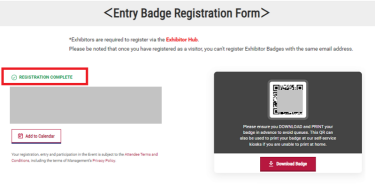
*Badges will be available for download 3 weeks before the show.
You can also print them at the venue using a QR that you will receive via email.
Frequently Asked Questions
Q. I left the page halfway through. I would like to continue from where I left off.
A. You will receive an email titled "Continue your Registration" from email address [email protected]
Click the “Continue Your Registration” button to resume from where you left off.
*Note: The button is valid only once.
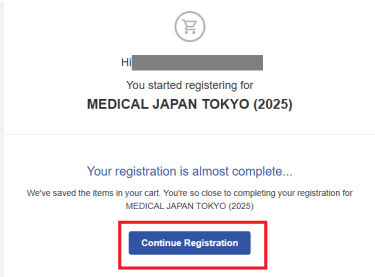
Q. I can't find the "Continue Your Registration" email / I want to reset and start from the beginning.
A. Please re-enter your email address on the registration page and wait for the pop-up to appear.
Click "Start New Registration" to register again.

Q. Request to delete registration
A. Please contact the following inquiry desk with your "name," "company name," and "email address" for deletion.
Q. I clicked "Next," but I can't proceed to the next step.
A. Please try the following:
Try using a different browser (e.g., if you're using Google Chrome, switch to Microsoft Edge).
Try using a different device (e.g., if you're using a PC, try a smartphone).
Try changing your network environment (e.g., disconnect from Wi-Fi).
Wait for a while and try again later.